Estimates
Line items, saved items, tax optional, your letterhead, English or Spanish per document.

Send customers a link or QR code. They fill out a short job request, and it lands in your app with the details and photos, so you can price it before you call back. From there, estimate, change order, and invoice. Use QuickBooks Online? Your estimates, invoices and payments go there on their own. Start free for 14 days, no card needed.
$39 a month after the trial. Cancel anytime.
 View from the founder's cab
Job Holster was not dreamed up in an office. It was built from the cab, on real job sites. Our founder runs an excavation company, and for years his system was text threads, a notebook on the dash, and memory.
Leads piled up in those threads. Estimates slipped, callbacks got missed, and good jobs died in the scroll. He needed a dead-simple way to keep track of work. It did not exist, so he built it.
Every part of the app comes from that jobsite reality. No bloated software, no complicated setup. Just a simple way to keep every job, note, and follow-up within reach.
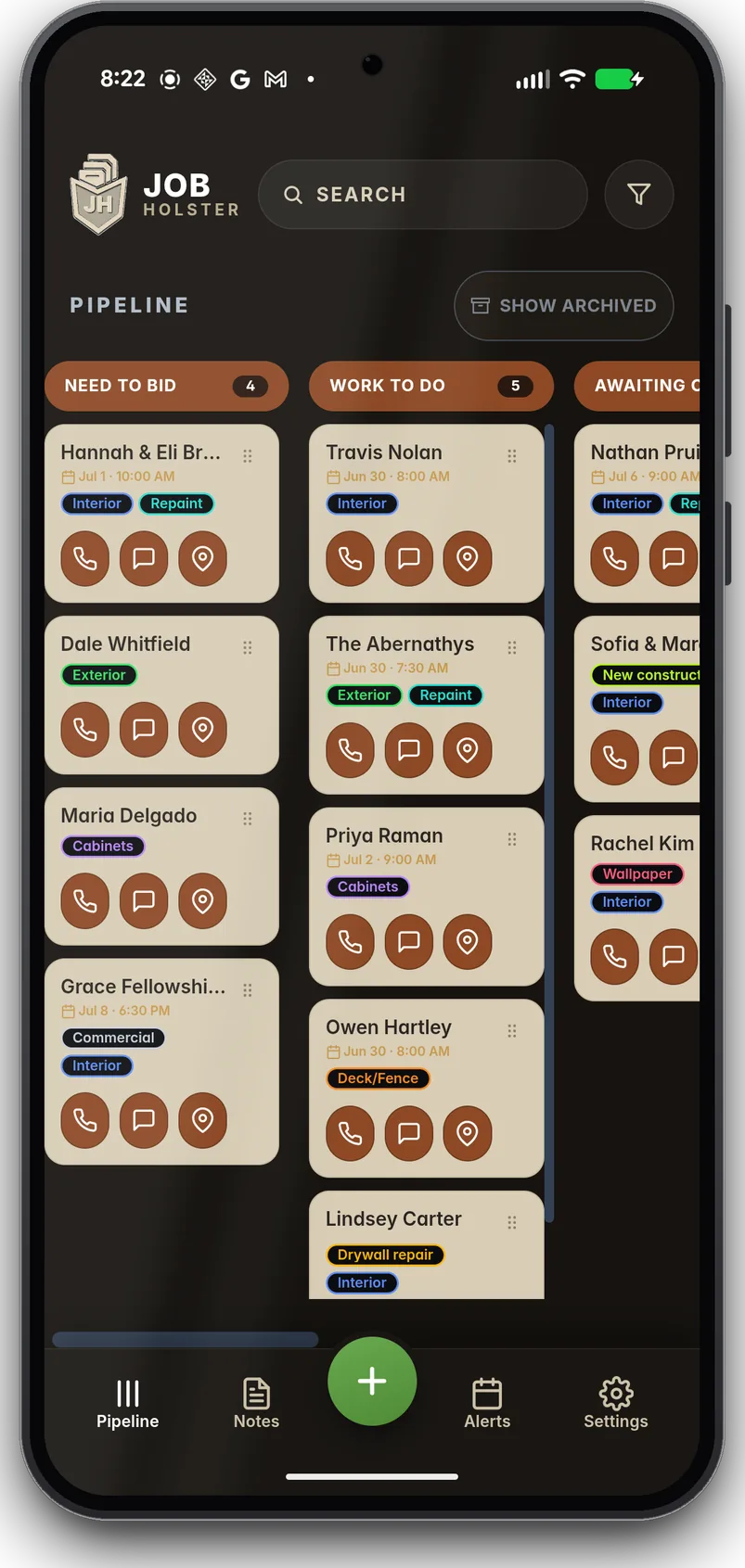
Open the app and every job is right there. Drag work from lead to paid, tap to call or text a customer, and see exactly what needs you today.
Job Holster gives you a job request form with its own link and QR code. Text the link, add it to your website, or print the QR code for a business card or the truck door.
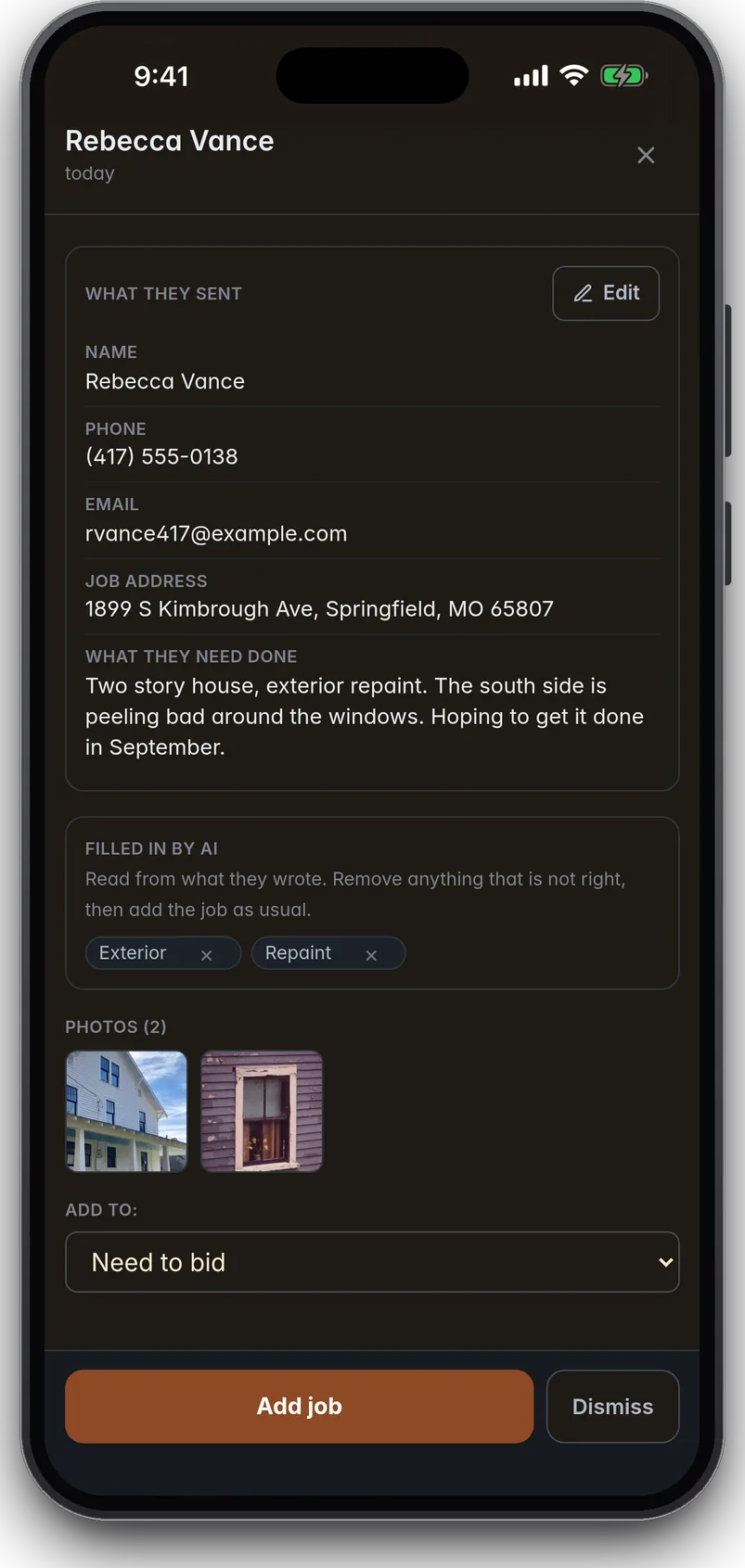
Your customer fills in their name, phone, email, address, what they need done, and photos. It opens in their phone's browser, in English or Spanish. No app, no account.
It lands in your New requests inbox in seconds, with the photos. Tap Add job and it is in your job list. If you turn AI on, it reads what they wrote and fills in your tags and custom fields. Remove any with one tap.
Already got the job in a text? Paste it into the app and AI fills in the name, phone, and address.
Customer calls? Start the job, tap Request their info, and text them the link before you hang up. Their info and photos land right on that job, and nobody has to spell an address over the phone.
Build an estimate on the job, get it signed on your phone, and turn the won estimate into an invoice. Add a change order the minute the job changes. Send any of them as a PDF by text or email.
Line items, saved items, tax optional, your letterhead, English or Spanish per document.
The contract total your customer actually reads, credits and additions, one tap.
Built from the estimate and sent as a PDF. Turn on card payments and customers can pay from the link. Mark cash or checks received when they come in.
Connect QuickBooks Online once in Settings and tap Start sending. After that, every estimate and invoice you send, and every payment on them, shows up there. Fix a sent estimate or invoice here and it is fixed there. No typing it twice.
One simple app that keeps every lead, bid, photo, and follow-up on the job it belongs to.
Drag every job from new lead to paid through stages that match how you run work.
Get an alert when a new job request comes in, and a reminder when a callback is due. Nothing slips.
Everything stays with the customer it belongs to. Record a voice memo and turn it into a readable note. Snap before-and-after photos and share a photo report with your name on it.
No service on site? Keep working with saved jobs, photos, and voice memos. Changes sync when you reconnect. Let syncing finish before moving to a new device.
See every job and reminder on one calendar, by month, week, or day. Drag a job to another day when plans change.

No crew location tracking, no 200-step setup, no per-seat math. Job tracking, estimates, and invoices that stay out of your way.
Estimates and invoices you send here, and the payments on them, show up in QuickBooks Online on their own. No retyping.
Use the app in either language, whichever works for your crew.
Job Holster comes straight off the jobsite. These are real days in the field, tracked in the app you can hold in one hand.






Every lead, bid, photo, and follow-up stays on the job it belongs to, from the first request to the day you get paid.
Try the full workflow free for 14 days, up to 50 jobs. No credit card required. After that, one subscription covers you and up to nine teammates.
$39 a month, or $300 a year, saving 36%.
Free for 14 days, no card needed. If you do not subscribe, you can still edit your existing jobs for 90 days, but not add new ones.
Billed through the App Store or Google Play. Renews automatically until you cancel.
Yes. You can view and edit saved jobs, change statuses, take photos, and record voice memos without service. Changes sync when you reconnect. AI analysis, transcription, QuickBooks sync, card payments, invitations, and subscription actions need internet.
Start with 14 days of full access for up to 50 jobs, with no credit card required. After that, Job Holster is $39 a month or $300 a year per workspace. Without a subscription, existing jobs stay editable for 90 days, but you cannot add new ones.
Yes. One subscription includes you and up to nine invited teammates at no extra charge. Everyone shares the same job list and customer list, each with their own sign-in.
No. Text or screenshots you choose to analyze, job descriptions sent through your request form when AI is on, plus existing customer details used for matching, are processed by Anthropic. Voice transcription uses Cloudflare Workers AI in the mobile apps or the browser's speech service on supported web browsers. Under their published terms, Anthropic and Cloudflare do not use this content to train models. See our privacy policy.
Once your changes finish syncing, sign in on a new phone or tablet and your jobs, photos, notes, and follow-ups are available there.
Yes. From Settings, open Setup & advanced, then Save a backup of your jobs. The ZIP includes spreadsheets for jobs, messages, notes, voice transcripts, and statuses. Photos, audio, file attachments, and change history are not included. Account deletion is available in account settings after confirmation, or through this page if you cannot sign in.
Yes. Build it in the app and send it as a PDF by text or email. Your customer does not need the app to read it. When they say yes, they sign on your phone and the estimate becomes the job's contract. Change orders and invoices follow from there. Once you turn on card payments, your customer can pay an invoice or an estimate deposit by card online.
Yes, with QuickBooks Online (Simple Start, Essentials, Plus or Advanced) for US businesses. Connect it once in Settings and tap Start sending to QuickBooks. After that, estimates and invoices you send, and the payments on them, go to QuickBooks on their own. It only goes one way, and it never changes or deletes the invoices, estimates or payments already in your QuickBooks. Drafts stay here, and nothing you sent before you turned it on goes over. It does not work with QuickBooks Desktop, Solopreneur, Self-Employed or the free plan.
Share your link or QR code. Your customer fills out their name, phone, email, address, what they need, and up to 15 photos. No app, no account, and it works in English or Spanish. The request lands in your New requests inbox. Review it, then tap Add job. You pick which fields are required, and you can turn the form off any time.
No. Customers get a PDF by text or email, or fill out a job request from a link or QR code. Nothing to install on their end.
Yes. Invite them from Settings. Any job one of you adds or updates shows up for the whole team right away, and each person gets their own color on the calendar.
Your jobs and customer information are private to you and the people you invite. We do not sell your data, and the AI features never train on it. The privacy policy has the details.
Yes. Cancel from your App Store or Google Play subscriptions whenever you want. No phone call, no contract. Cancel before the renewal date and you will not be charged again.


Get Job Holster and take control of your day. Less chaos, more jobs done right.
Available now on the App Store and Google Play, for iPhone, iPad, and Android.
Know another contractor who needs this? Send them your link from Settings. You both get a free month when they subscribe.